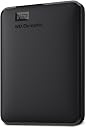
Desertcart purchases this item on your behalf and handles shipping, customs, and support to Gambia.
💼 Elevate your data game—because your files deserve first-class storage.
The WD 4TB Elements Portable External Hard Drive offers a massive 4TB storage capacity with USB 3.0 connectivity for fast data transfers. Its compact 2.5-inch design and plug-and-play functionality make it the perfect reliable companion for professionals needing portable, high-capacity storage backed by Western Digital’s trusted quality.


| Asin | B0713WPGLL |
| Best Sellers Rank | 275 in Computers & Accessories (See Top 100 in Computers & Accessories) 5 in External Hard Drives |
| Box Contents | Portable hard drive, USB 3.0 cable |
| Brand Name | Western Digital |
| Cache Memory Installed Size | 4 |
| Color | Black |
| Compatible Devices | Festplatte |
| Compatible Video Game Console Models | Nintendo Switch |
| Customer Package Type | Standard packaging |
| Customer Reviews | 4.6 4.6 out of 5 stars (276,261) 4.6 out of 5 stars |
| Data Transfer Rate | 1 Megabytes Per Second |
| Digital Storage Capacity | 4 TB |
| Enclosure Material | Made from high quality materials. |
| Form Factor | 2.5-inch |
| Hard Disk Average Latency | 1 Milliseconds |
| Hard Disk Description | Mechanical Hard Disk |
| Hard Disk Form Factor | 2.5 Inches |
| Hard Disk Interface | USB 3.0 |
| Hard Disk Rotational Speed | 5400 RPM |
| Hard Drive Size | 4000 GB |
| Hardware Connectivity | USB 3.0 |
| Installation Type | External Hard Drive |
| Item Dimensions L X W X Thickness | 11.2L x 8.1W x 2.1Th centimetres |
| Item Type Name | WD ELEMENTS PORTABLE 4TB BLACK WORLDWIDE |
| Item Weight | 0.52 Pounds |
| Manufacturer | WD |
| Manufacturer Part Number | WDBU6Y0040BBK-WESN |
| Media Speed | 1 |
| Model Name | WDBU6Y0040BBK |
| Model Number | WDBU6Y0040BBK-WESN |
| Network Connectivity Technology | USB |
| Number Of Items | 1 |
| Product Features | Portable |
| Product Warranty | 2 Years |
| Read Speed | 1050 Megabytes Per Second |
| Specific Uses For Product | Data Storage |
| Unit Count | 1.0 count |
| Upc | 718037855981 |
User
Compact, Fast and Perfect for Everyday Backups
This WD external hard drive is small, lightweight and very easy to use. It works straight out of the box with plug and play on Windows, and it only takes a quick reformat to use with Mac. The 1TB storage is plenty for photos, videos, documents and backups.Transfer speeds are fast with USB 3.0, and files copy smoothly without any issues. It feels well made and reliable, and it fits easily in a pocket or bag for travel.Overall, this is a great option if you want simple, portable and dependable storage at a very reasonable price. I would definitely recommend it.
User
“WD Elements: Because your files deserve a safe home.”
Quietly Does Its Job Like a Digital HeroThis WD 2TB Elements hard drive is not flashy. It doesn’t light up, beep, or demand attention. It simply shows up, holds all your stuff, and asks for nothing in return—and honestly, that’s the kind of energy I need in my life.Setup was plug-and-play easy. I plugged it in, my computer immediately recognized it, and suddenly all my photos, videos, work files, and “I’ll organize this later” folders had a safe place to live. Transfer speeds over USB 3.0 are fast, it runs quietly, and it’s small enough to toss into a bag without feeling like I’m carrying a brick.It’s been reliable, stays cool, and hasn’t given me a single scare—which is exactly what you want from something holding 2TB of your digital existence. No drama. No nonsense. Just storage doing storage things very well.If you need extra space and peace of mind, this drive delivers.
User
Working Very Well Playing PS4 Games On My PS5
Very compact and easy to use at a very competitive price for 2TB.I bought this specifically to take my PS4 games off the internal PS5 SSD but I didn't want to get a 'game drive' specific one as I would have more freedom if I wanted to partition it and backup some PC files as well.The setup couldn't have been easier, I took it out of the box, plugged it in and the PS5 recognised it instantly. I had to format the drive before I could use it which I thought might take a few minutes at most but only took 5 seconds, then I selected around 360GB of PS4 games/apps and started the transfer.After the format I had 1.8TB free which is more than enough and with all drives they need space for their base operating software which is usually a small fraction off the stated capacity, a lot of people clearly don't understand this from some of the reviews complaining they got less capacity than they purchased -_-The transfer was speed really good for a physical drive, better than I was expecting, it took just over an hour for it to finish moving the whole 350+GB to the external drive.My PS5 told me once that the drive wasn't removed properly after powering on after being in rest mode, I didn't remove the drive at all so I'm not sure why it said that. This error message has only come up once and happened the first time the console had been in rest mode with the new drive connected. The console has been in rest mode and turned off multiple times after this message and hasn't given me the error since so it may just be a one time thing.I'll update this review if I come across any issues.Loading PS4 games from the External as opposed to launching them from the internal SSD was a little bit slower. All times below were timed from the point of clicking resume on my game file to actually getting into the game.- Resident Evil 7 took 77sec to load which I'd played the day before on the PS5 SSD which probably took under 30 seconds. In-game the performance was perfect, no frame drop, no noticeable delay on textures rendering in.- Horizon Zero Dawn took 30-40sec which was actually quicker than RE7 despite being a huge open world game, the in-game performance was perfect too even with the 60FPS patch.- God of War took 29 seconds to load into the game.- Batman Arkham Knight took just 32 seconds to load my save and get into the game.- Mortal Shell took just 20 seconds to load into the game.- Call of Duty Modern Warfare took 56 seconds to load into the game from chapter selection.
User
Works Fine
I am 71 and know next to nothing anout computers, but I don't suppose I'm alone in that, so perhaps the following might be of use. I hope so. This was almost too straight-forward! I expected it to be "plug and play" but no instructions came up on the screen when I did so. After some time I discovered that it was detected by my (Windows11) PC, under "This PC", but I was at a loss how to make it "work". Eventually, after referring to Chat GPT, I discovered that you simply "drag and drop" any files/documents/pictures onto it. When I became more confident I dragged and dropped my entire "My Documents", onto it, which it swallowed up in a very few minutes. I was relieved to find that they were indeed copied onto the device, and not transferred onto it; my Documents remained on my PC. I am now wondering how it "knows" when I have made a small amendment to a single document next time I do a backup, or whether it will copy my entire Documents all over again, which seems a terrible waste of effort. Finally, I wondered whether there was a minor fault because it had a memory available of 1.81TB all through my experimenting with it, but then, having swallowed pretty much my entire life's work, it now says 1.80 TB. In other words, all my documents, files, pictures and videos have taken up one 181st of its available memory. I could probably have made do with the 1TB version! In summary, a good device but we older customers would appreciate a modicum of basic instruction.
User
Reliable and quiet
I've had a fair few of these drives over the years and I've never had a 2.5" WD Passport drive fail. Even my ancient 250GB WD Passport drives still work. The longer I live, the more storage I seem to need.I used to think the "Ultra" drives were faster than the USB3 drives, but on my PC, there doesn't seem to be much in it if anything, speed-wise. This 5TB drive is quiet, has a decent turn of speed, though not blisteringly fast, and I expect it to give many years of reliable service.Supplied with a short USB A (3) USB B (3) lead, it's simply plug and play and Windows recognises it and allows you to use it. It comes supplied with some WD software, but I just popped that in a folder unused, as the WD Passport drives always work fine out of the box. My drive was made in Thailand, and looking at a few of them, most of my WD Passport drives were made in Thailand (even the really old 250GB ones), though I have one which was made in Malaysia. Oddly enough, the Malaysian drive is my only WD Passport I've got that's a little bit noisy as it vibrates slightly in use. It works fine, but I'm guessing if I do ever get an external 2.5" drive fail on me, it'll be that one. All the others I have are quiet.Whatever you need external storage for, the WD Passport drives are excellent, and when you upgrade your PC, you don't need to faff about transferring all your data over if you use these drives. Highly recommended!
User
Does what it says
Time will tell how good this drive is but I've got many WD drives and have never been let down (yet - famous last words!).I purchased it to use as a TV recorder for my grandfather (on a Toshiba TV) and it worked straight out of the box.It was well packaged.As with all drives, it doesn't actually have the capacity stated (you will never be able to put 1TB of items on a 1TB drive for example due to formatting and software that's preinstalled on it), but that's true of ALL drives.Some advice if using it, as I have, for a TV - it will likely need formatting (I was fortunate mine didn't) and the formatting required depends upon your TV. Read your TV's user manual or simply type its model number and 'what file format' into Google to find out. Then plug the hard drive into a laptop/computer, select it on your device, right-click it and go down to 'format', select the appropriate format for your TV and 'start', and away you go. Most times, when people find it doesn't work with the intended device, it is because it hasn't been formatted to the correct file type (this can be true of computers too). Additionally, some file types can store more information than others, so if you're trying to record a movie for example, depending on the file type you've selected, it may record one file, or it may have to break the movie up into several smaller files. If that happens - it's not the fault of the hard drive!Also, if using with a Toshiba TV, it can be hard to find how to access it - that's the fault of the TV software, not the hard drive. (We found the setting hidden under 'Home button' > 'settings' > 'recordings').My 5 other WD drives are anything between 5 and 13 years old, all between 1 and 4TB, 2 are portable and would be taken to and from work every day for years on end, bashed around in bags (I'm not gentle with them) often not in a protective case (they can be purchased if needed), and I've had not a single issue to date. They have all had very heavy use, with hundreds of files being used, edited, and deleted every day and so I expect this drive will be as hardy... But remember: They're electronic devices and they CAN FAIL (I've had other brand drives fail) so if you are using it for anything IMPORTANT, ensure you make backup copies of files either to a second drive or to a cloud-based drive (for photos, Amazon Photos is free and unlimited for Prime members - but you only get 5GB free for videos, and other documents aren't supported - for that, try Google Drive and One Drive but again, the free service is limited in size). Cloud-based drives can be accessed from anywhere in the world but can be hacked - but physical backups can be lost in house fires etc so if you have both a drive and its backup in the same location they could both be lost, as happened to my family. I have both physical backups and cloud-based backups because I have hundreds of thousands of files.As this is only being used to record TV occasionally, I should imagine it will still be working fine in 30 years time! Though if it should fail, I'll come back to edit this review ;-)
User
Recommended by Computer Tech & So Easy to Use
I was in the market for a portable hard drive as my laptop has limited storage. Additionally, working on multiple devices, it is an easy way to transport documents, enabling them to be opened and edited at a time and place to suit.WD was a brand recommended to me by the technician who services my computer equipment, so I felt confident in selecting the brand. After reading up on a number of alternatives I decided on 1TB unit by Western Digital. This was competitively priced and wasn't much more expensive than one with half the capacity, so it was a no brainer.Once opened, simply plug in to your device using the USB lead provided and away you go. For example, if you have a word document open that you wish to save to the drive, simply press “save as”, locate the WD on your control panel, open the folder and click “save”.I have to say that this is perfect for my requirements. The unit is very compact, has a large memory capacity and stores all of my personal and important documents off of my computer’s inbuilt storage. It has also increased the speed of my laptop by transferring these documents from my computer, which was an added bonus.Best Uses : To free up space and back up your laptop’s (or other device’s) internal hard drive.Pros : Excellent value, compact size, easy to set up, sleek, compatible with Windows 10.Cons : None.In summary : A very good, competitively priced portable hard drive. I hope you found my review helpful and would love for you to click “yes” if you did.
User
Great for the money
Great HDD. Still going strong
User
Spełnia wszystkie wymagania
Bardzo pojemny magazyn pamięci
User
4.5
ممتازة لكن بطئيه
User
Excellent Value and Performance
I recently purchased the WD 4TB Elements Portable USB 3.0 High Capacity Hard Drive and I am extremely satisfied with my purchase. The drive is compact and easy to use - just plug it into my computer's USB port and I'm good to go. The 4TB of storage is more than enough for my needs, and the transfer speeds are reasonable for a standard 5400rpm HDD..One thing that initially concerned me was the drive's tendency to get hot during use. However, I have used it extensively over the past few weeks and have not experienced any issues with overheating.In terms of value, I believe the WD 4TB Elements Portable USB 3.0 High Capacity Hard Drive offers excellent value for the price and the high capacity and decent transfer speeds make it well worth the investment. If you need a lot of storage on the go and are looking for a reliable and high-performance option, I highly recommend the WD 4TB Elements Portable USB 3.0 High Capacity Hard Drive.
User
Excelente, me salvó la vida!
Excelente producto! Lo compre y decidí usarlo como respaldo dónde guardé muchas fotos y documentos y me olvidé de él por completo. Este mes decidí descargar todos esos documentos de otra memoria externa que tenía y descubrí que todos mis archivos se habia perdido. Me puse muy triste hasta que me acordé de esta memoria externa y gracias a Dios todo estaba ahí intacto! La verdad si vale la pena tener memorias externas de excelente calidad, y varias, por si acaso. Me salvó la vida!
User
Great hard drive. Everything is great about it. Go for it.
This is a great hard drive. I previously had a 1 TB hard drive of WD and that worked really fine. That is why I decided to go for a 2TB hard drive of WD. Though, Seagate hard drives are much better than WD because they are thinner and they sustain for a long time like WD.I purchased it @Rs. 5599.Pros-1. WD is a very reliable name in the field of hard drives. So it is reliable.2. 2-year warranty.3. small in size.4. Reading speed is amazing. I got around 150 MBps/ 1.2 Mbps while reading. (Data was a movie and USB port was USB 3.0)5. Writing speed is also great. I got around 55 MBps/ 440 Mbps while writing on the hard drive. (Data was a movie and USB port was USB 3.0)6. The speed of reading and writing on USB 2.0 ports is also great.7. USB 3.0 cable is already included in the package. So you don't need to purchase a USB 3.0 cable separately.8. The length of the cable is enough for normal usage.9. The product is original. So you can get is registered on WD website. You will also get your warranty from there.10. Cheaper than Seagate models. (in general)Cons-1. If you are in need of a long USB 3.0 cable then you will be disappointed. The length of the cable is just enough for normal usage.2. The hard drive is somewhat thick. You will get a Seagate hard drive of the same capacity to be slimmer.Final comment- If the price is not a big issue for you and you want a slimmer hard drive then go for Seagate hard drive. Else this is certainly one of the best choices.
Trustpilot
2 weeks ago
2 weeks ago